 SlideFarm
Scale Ova review (2026): what this AI Shopify store builder really delivers
We went through Scale Ova's eight demo stores: what it builds, what it costs, and how it compares to DropMagic and Atlas.
You want a tool that builds your Shopify store for you, and Scale Ova keeps showing up in your searches. Before you hand it your project, you want to know two things: what it actually builds and what it costs once your store is live. We went through its eight demo stores on October 12, 2026, on desktop and on mobile, to answer both.
How we tested
Scale Ova publishes eight stores generated by Ova on its demo page: Attack Shark, Flow, Lumai, Vestago, Mixup, Studio Rotin, ZOHI and Matchata. We opened each one in English and in French, then read their copy, their prices and their claims. These are not our stores: every screenshot in this article comes from those demos and says so in its caption. We also used the app's Shopify App Store listing and the Scale Ova FAQ.
What Scale Ova does
You can start in four ways, depending on where you are:
- Ova Start: you describe what you sell, your brand and your references. Useful if you don't have a supplier yet.
- Ova Link: you paste a product page link, an AliExpress listing for example. Ova picks up the title, price, images and description.
- Ova Recraft: you connect your current store. Ova tells you what is holding back your sales, then rebuilds it.
- Ova Studio: product photos and banners, refined in a chat.
Before the first page, Ova sets your market, your promise, your offers and your buyers' objections. You can see it in the demos: each store speaks to a specific buyer, and its sections answer that buyer's doubts.
What we saw in the demos
Mixup: a whole store from an AliExpress link
Mixup started from an AliExpress supplier link for a portable blender. The result has a real homepage and a product page, with a headline about use rather than specs: "The portable blender that turns your fruit into a smoothie in 30 seconds. Anywhere."
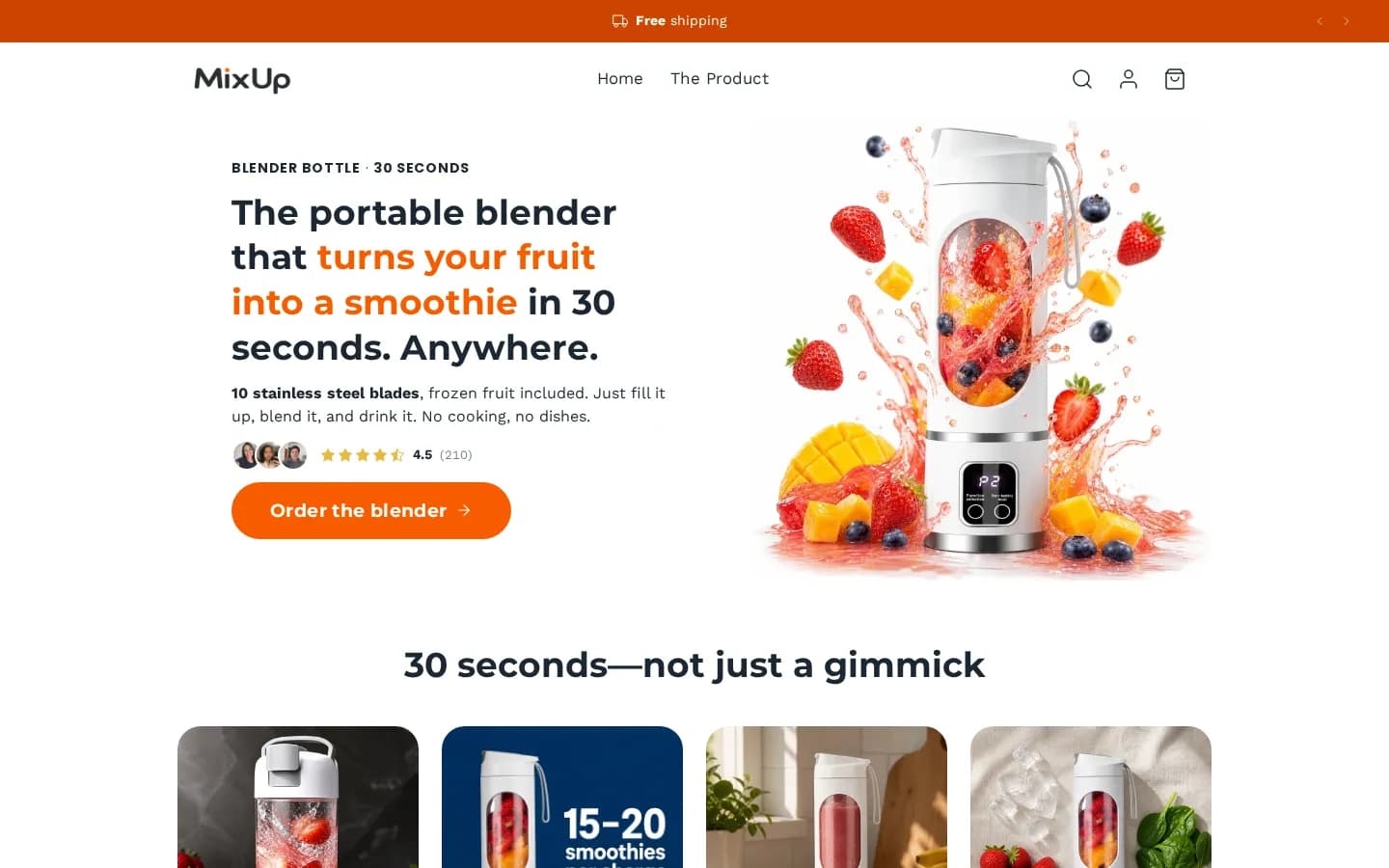
Below the hero, Ova turned the supplier's specs into readable benefits: the 10 stainless steel blades, the USB-C battery, the number of smoothies per charge. Then come three moments of use, three steps to make a smoothie, and an FAQ on the doubts buyers raise most (cleaning, durability, noise). That is the work a first-time merchant forgets, and it is often where a buyer hesitates.
Vestago: a brand, not a theme template
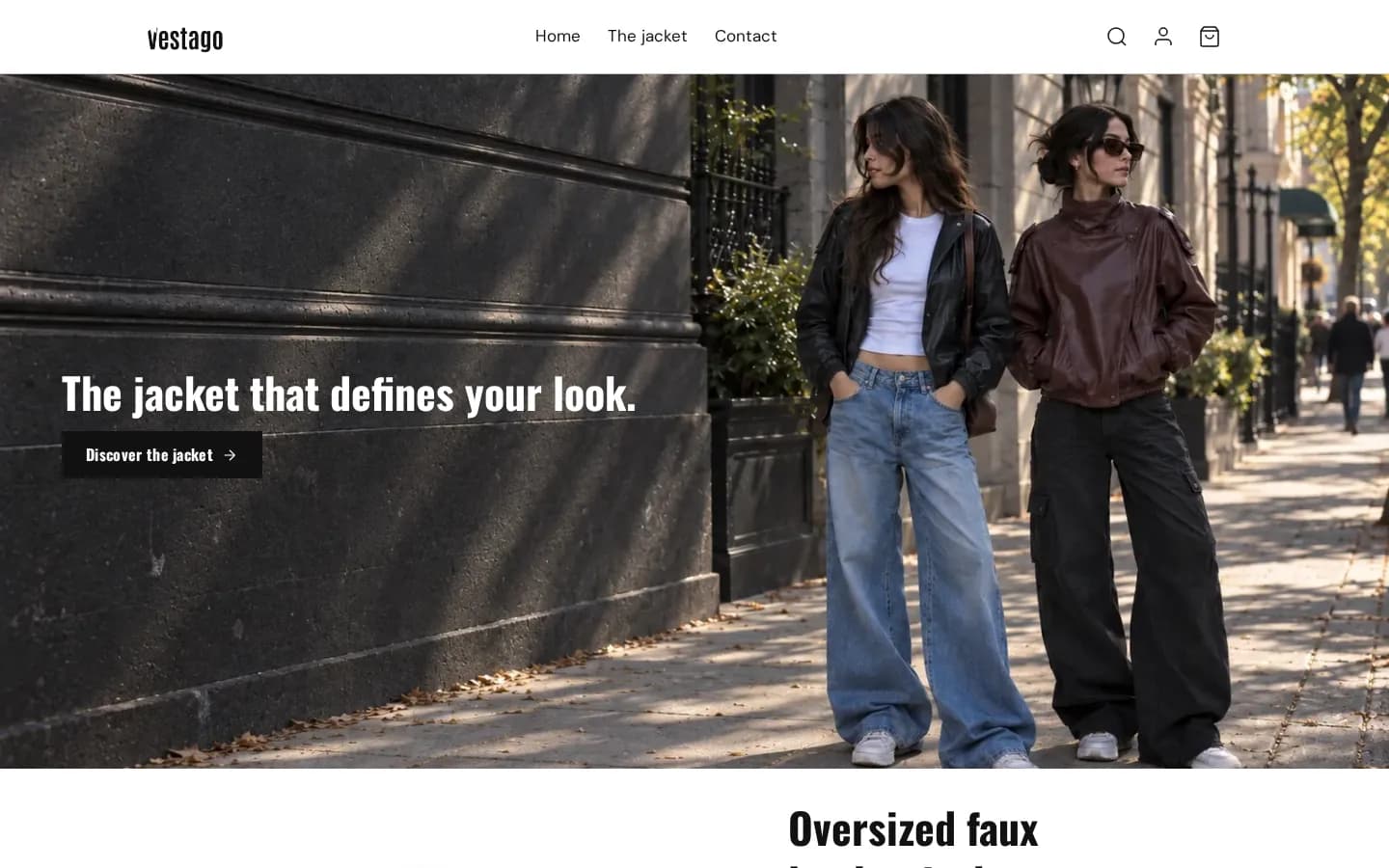
Vestago sells a single jacket. Yet the store looks like a fashion brand: a full-width street photo, a condensed typeface, a six-word headline. Tools that start from a single theme often produce stores that all look alike. Here, colors, fonts and layout change from one demo to the next.
Lumai: the product page, on desktop and on mobile
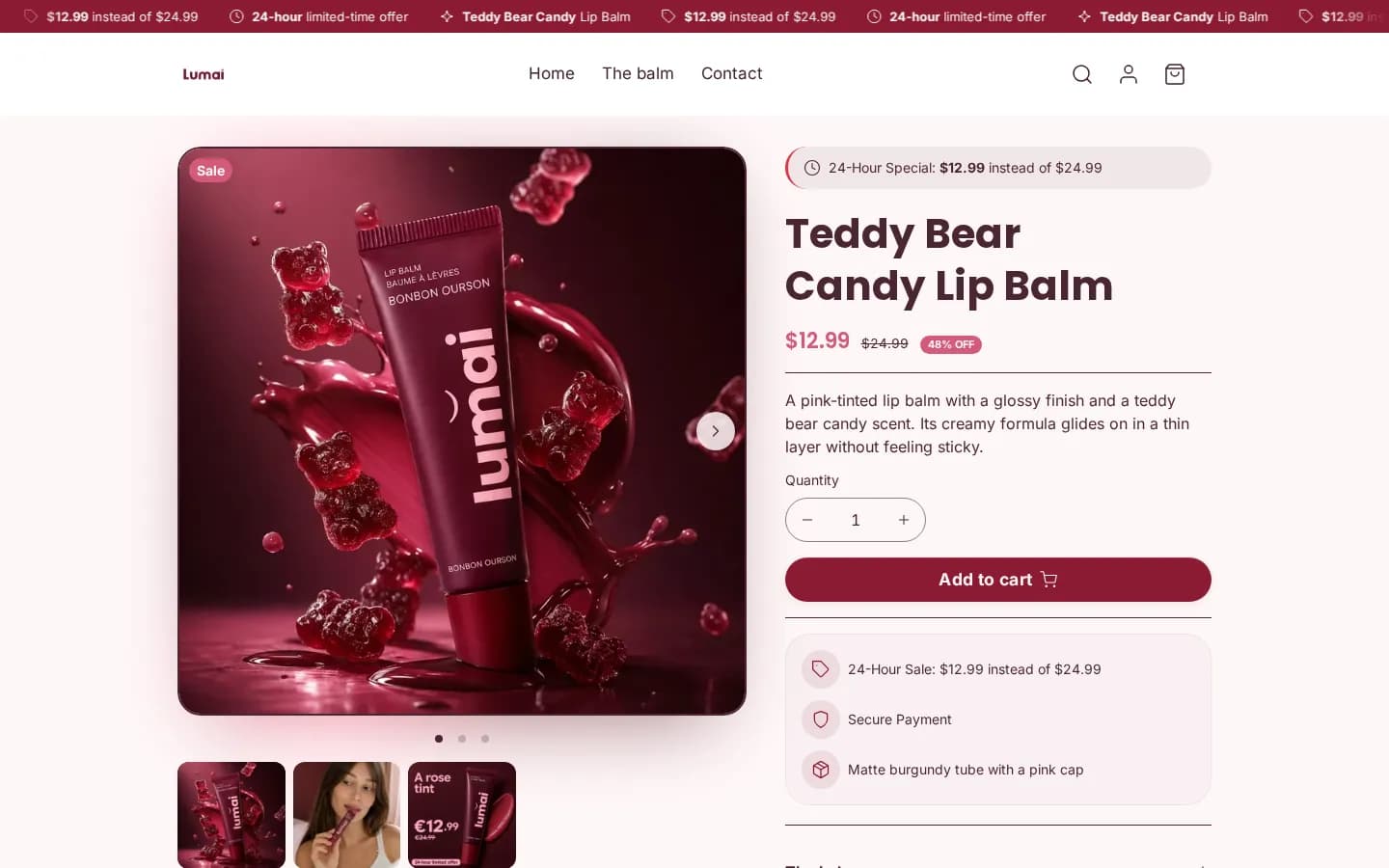
The Lumai lip balm page, at the top of this article, shows what Ova does with a product page. The price sits at the top, the benefit fits in one sentence, and the reassurance (secure payment, packaging details) sits under the add-to-cart button. On mobile, the three benefits come right below the photo, before the title.
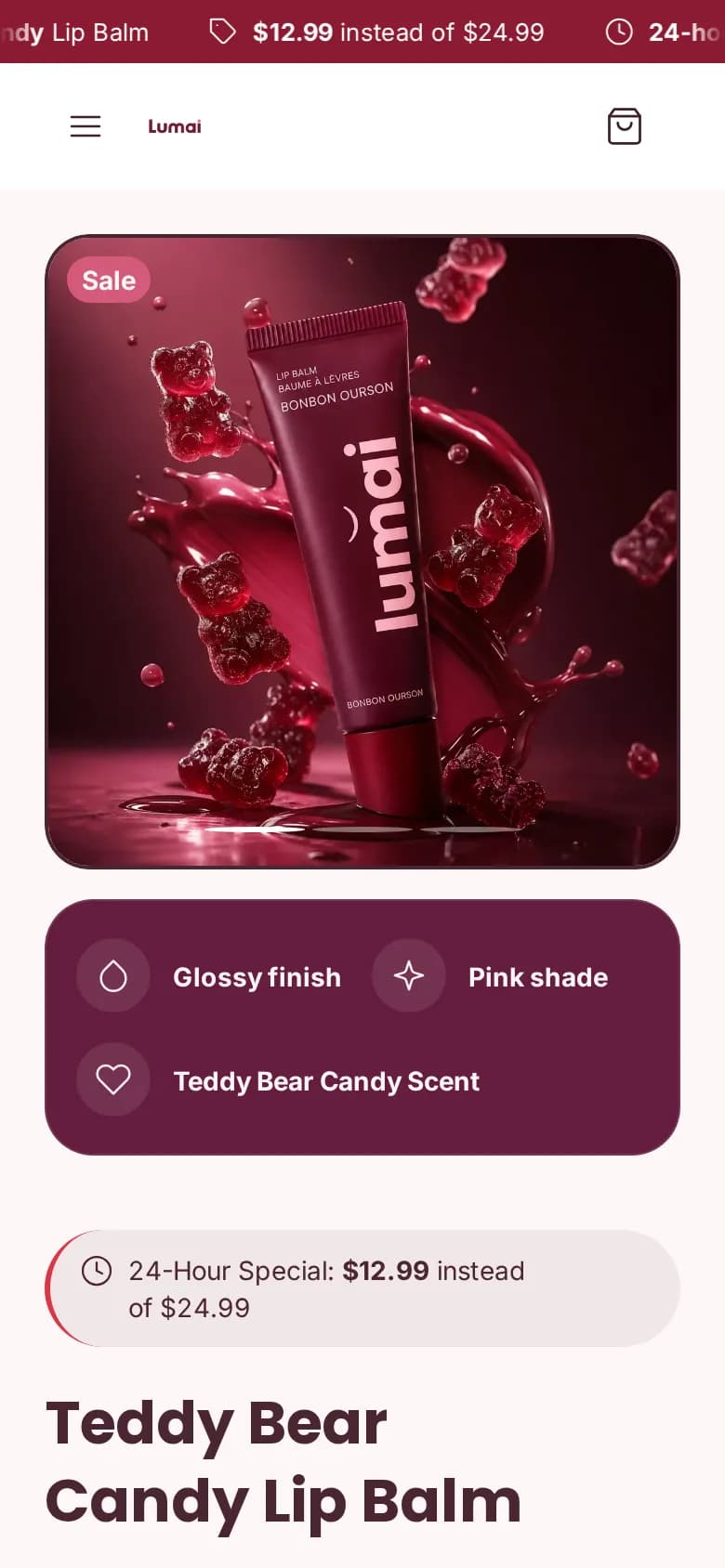
The page answers the two questions a buyer has before ordering a tinted balm: will the color stay light, and is the sale price real. What's missing: shipping and returns under the button, and customer reviews.
What it costs
Building your store and browsing its preview costs nothing, with an AI budget to try Ova. You pay when you publish to Shopify. There are three plans, Starter, Pro and Ultra, billed by Scale Ova through Stripe. They differ by the number of live stores and the monthly AI budget, and their prices show in the app before you pay.
On top of that comes Shopify, which you pay to Shopify. In France, the Basic plan costs €27 a month billed yearly or €36 billed monthly, after a three-day trial and three months at €1 (prices checked on September 11, 2026). Prices vary by country.
One thing to know before you commit: the Scale Ova theme needs the app and an active plan. If you cancel, your visitors see a "license inactive" screen. Your products, customers and orders stay in Shopify, but you need to publish another theme before you leave.
Scale Ova vs. DropMagic, Atlas and the Shopify AI Store Builder
| Tool | What it generates | How you edit | To publish |
|---|---|---|---|
| Scale Ova | The whole store: theme, homepage, product pages, collections, menus, and the Shopify admin | By chatting, across the whole store | Starter at €49 a month |
| DropMagic | A 15-section product page, homepage on request | Section editor and AI rewrite per section | Pro at $79 a month |
| Atlas | A store on the Atlas theme, from a product link | Page editor | $39 a month, with caps |
| Shopify AI Store Builder | Store designs from a short description | Shopify editor | Free, plus your Shopify plan |
Sources: DropMagic test of September 25, 2026, official Atlas pages of September 11, 2026 and Shopify page of July 14, 2026. Among other caps, the Atlas plan limits published pages to five and orders placed through its cart to 250. Each tier above that is billed.
Our verdict
If you want a complete store and want to keep improving it by talking to it, Scale Ova is the most complete tool in this comparison. It doesn't stop at one page. It also handles what you would otherwise look for across ten screens of the Shopify admin. The demos show stores that each have their own identity, with copy that answers the buyer's real doubts.
Pick something else if you only want to test a product with one sales page for an ad: DropMagic or Atlas will do. Also know that the app is young. It has been on the Shopify App Store since April 2026, rated 5.0 from three reviews, against 45 reviews for DropMagic. There is less hindsight.
To make up your own mind, the simplest way is to build your store on scale-ova.ai and browse it before paying anything.
Frequently asked questions
Is Scale Ova free?
Building and browsing your store is free. Publishing it to Shopify requires a paid plan, and you still pay your Shopify plan to Shopify.
Do I need a Shopify store already?
No. You build and browse the store in the Scale Ova preview. You connect a Shopify store, new or existing, when you publish.
Who is behind Scale Ova?
Two French founders, Vincent Fredet and Milo Mahelin. Support answers in the app, by email and on WhatsApp. The store lives in your own Shopify account.
What happens if I stop?
At the end of your paid period, the Scale Ova theme no longer shows to your visitors. Publish another theme before you cancel. Your products, customers and orders stay in Shopify.